Astra Harmonica
Astra Harmonica is a navigable interactive solar system, usable for educational purposes. It was developed within the course Creative Programming and Computing (Polimi) together with Alessandro Manattini.
The idea is to create a “universe of sounds” in which every celestial body becomes a source of information and harmony: it is possible to navigate among planets and asteroids and ask questions to the chatbots of the respective planets.
If you do not feel like reading the entire article, you can watch the demo video below.
If instead you want to try the project yourself, you can do so at this link. For this purpose, I will first provide simple instructions on how to use the project:
- scroll up or down to zoom in or out;
- pinch and move to move on the plane parallel to the screen;
- get close to a planet to trigger the gravitational auto-lock system, so you can follow it in its orbit and ask questions to its chatbot.
Read the rest of the article if you want more in-depth details.
Architecture, objects in space and optimizations
The system uses Three.js as a graphics engine and structures the elements of the scene according to a hierarchy, in which larger objects orbit around smaller ones, recreating the solar system.
The class diagram is the following:
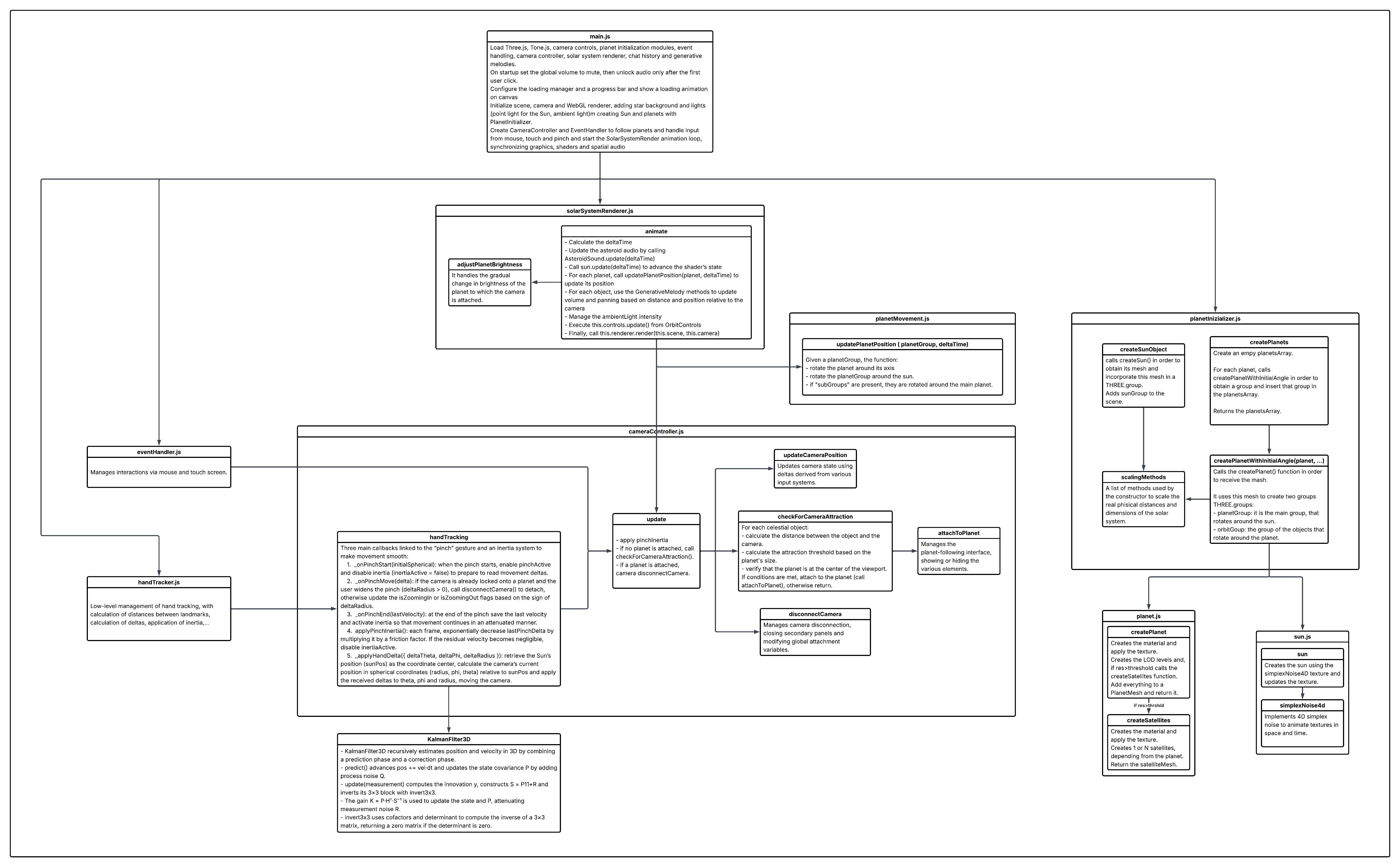
Revolution speeds, orbital speeds, axis tilts, and distances are all faithful to reality (even if scaled according to a logarithmic factor, in order to make the space navigable which, otherwise, would be much larger and more complex to manage).
Given the large number of elements in the scene and the intention of making the system usable on any platform, it was necessary to adopt an approach strongly oriented toward optimization:
- High-resolution image maps to define surface details via static textures.
- 4D Simplex noise to introduce procedural variations. This is an extension of Perlin noise to four dimensions: three spatial coordinates plus time. As in the traditional version, the surface is subdivided into a grid; for each cell, gradients are computed at the vertices and, through a weighted combination (interpolation), continuous and visually natural transitions are obtained. The final signal is built by layering multiple levels of noise (octaves), in which the frequency is doubled or halved at each level: their sum generates the overall effect shown in the video.
- Each planet is managed within a single THREE.LOD container, with three levels of geometric detail at increasing resolutions, selected based on distance from the camera.
The asteroid belt
The asteroid belt contains thousands of bodies and, without precautions, it would quickly become the main bottleneck both in terms of scene updates and for the audio part. For this reason we adopted a local activation approach based on proximity to the camera, avoiding checking and making everything “play” at the same time.
The first level of optimization is a 3D spatial hashing. Instead of checking about 3,000 asteroids every frame, space is subdivided into a three-dimensional grid of cells. Each cell has a side equal to a quarter of the maximum listening distance and is identified by a hash key of the type “15,3,-7”, corresponding to the discrete coordinates of the grid. When we need to find asteroids near the camera, we do not scan the entire set: we check only the cells adjacent to the current position (typically a small cube of cells), which contain a few asteroids instead of thousands. In this way the complexity of the problem becomes tied to local density, not to the total size of the belt.
The second level concerns audio: to avoid instantiating thousands of synths in Tone.js, we use voice pooling with a limited number of voices, specifically eight dynamically re-assignable synths. The behavior is similar to a very small orchestra: the available voices “move” where needed at the moment an asteroid must sound. When the system must play a note, it requests a free voice from the pool; if all are busy, it reuses the first one that becomes free, recycling it for the new sound emission. This keeps the computational load stable and makes resource consumption predictable.
Finally, the timing of the system is also adaptive: the loop interval is modulated as a function of camera speed, so that during fast movements the density of events remains controlled and the scene stays readable, while during approach and slow exploration precision and perceptual richness increase.
Navigation systems
The view of the system is “heliocentric”, meaning it always points toward the center of the solar system. Through navigation inputs, the user has control over two main parameters:
- the distance \(y\) between the Sun and the camera, which we can imagine as the radius of a sphere;
- the angles \(\phi\) and \(\theta\) that identify the user’s position on the surface of the sphere of radius \(y\) mentioned above.
There are two ways the user can change these parameters.
Mouse/Touchpad
The first control system is the mouse. The gestures are:
- Drag and rotate to move on the surface of the sphere;
- Scroll up to zoom in;
- Scroll down to zoom out.
Hand Tracking
We also implemented a control system via “aero-gestures”, which uses mediapipe to track a single simple gesture: pinch in and out.
How it works is shown in the gif below.
Gravity
The “Gravity” module coordinates the camera lock onto planets and creates smooth and contextual transitions. When the user zooms, the code computes the NDC projections of each planet and uses a dynamic proximity threshold to choose a target. At that point it disables free controls, locks the camera, and moves it into orbit via linear interpolation of vectors. To decide which body to follow, we project the 3D position of each planet into screen space and consider only those within a central radius. The “attraction” distance adapts based on the radius of the planet (or of the Sun), ensuring consistent targeting across bodies of different sizes.
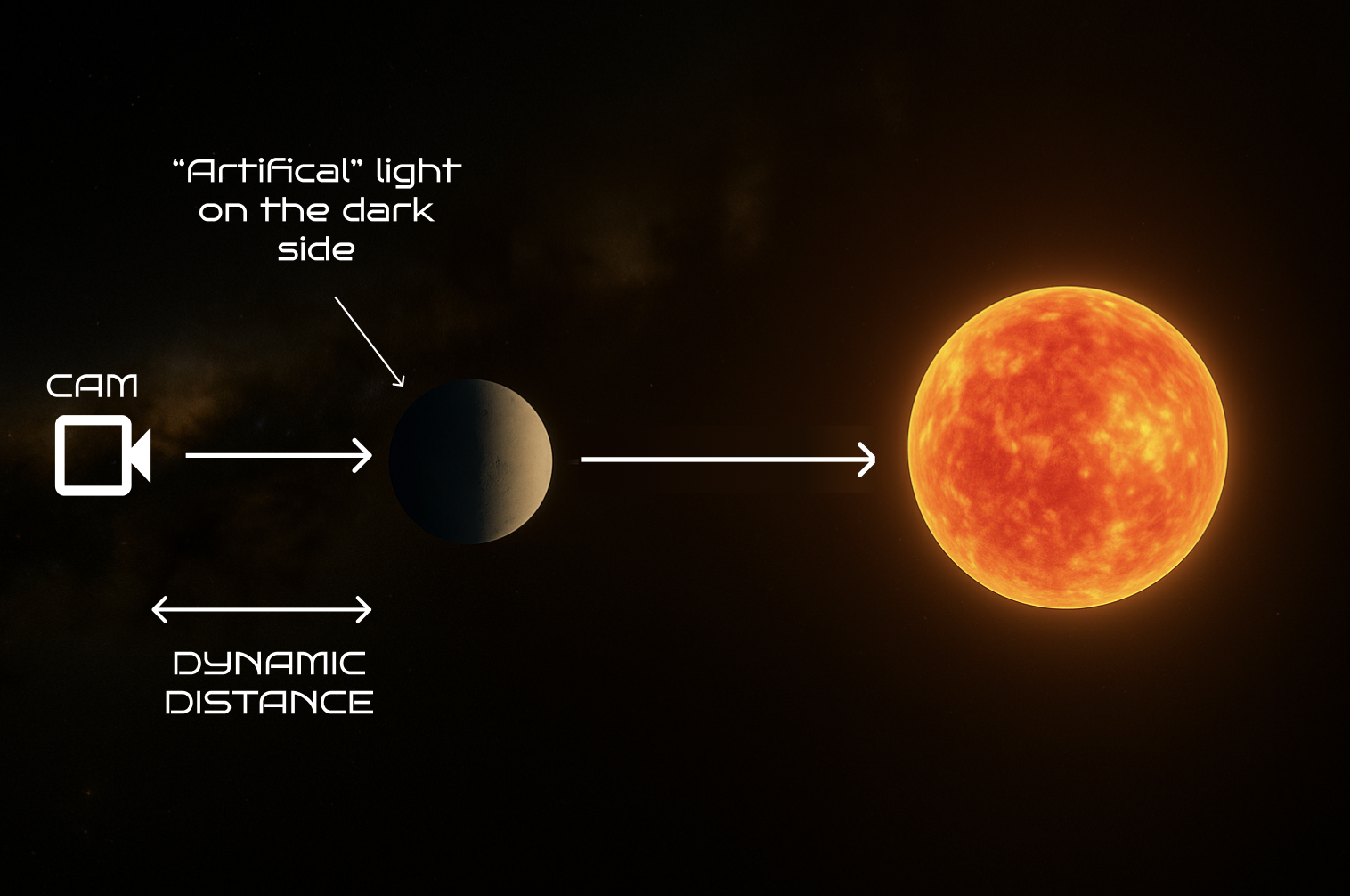
Note that a Rim light is also present to reveal the night side of the planet which, otherwise, would be dark (and since it is precisely the side onto which the camera is projected, this would be a problem).
Chatbot
The chatbot is a central feature of the software, designed to offer a highly focused and immersive educational experience: it is designed with specific constraints, so that answers are exclusively tied to the celestial body the user is observing through the camera, allowing deep exploration of the history, characteristics, and peculiarities of a single planet, fostering a more solid understanding.
Sound
In Astra Harmonica, sound is a structural component of the experience: the goal is to create a “universe of sounds” in which navigation in space corresponds to harmonic and timbral variations, maintaining musical coherence and a clear relationship between what you see and what you hear.
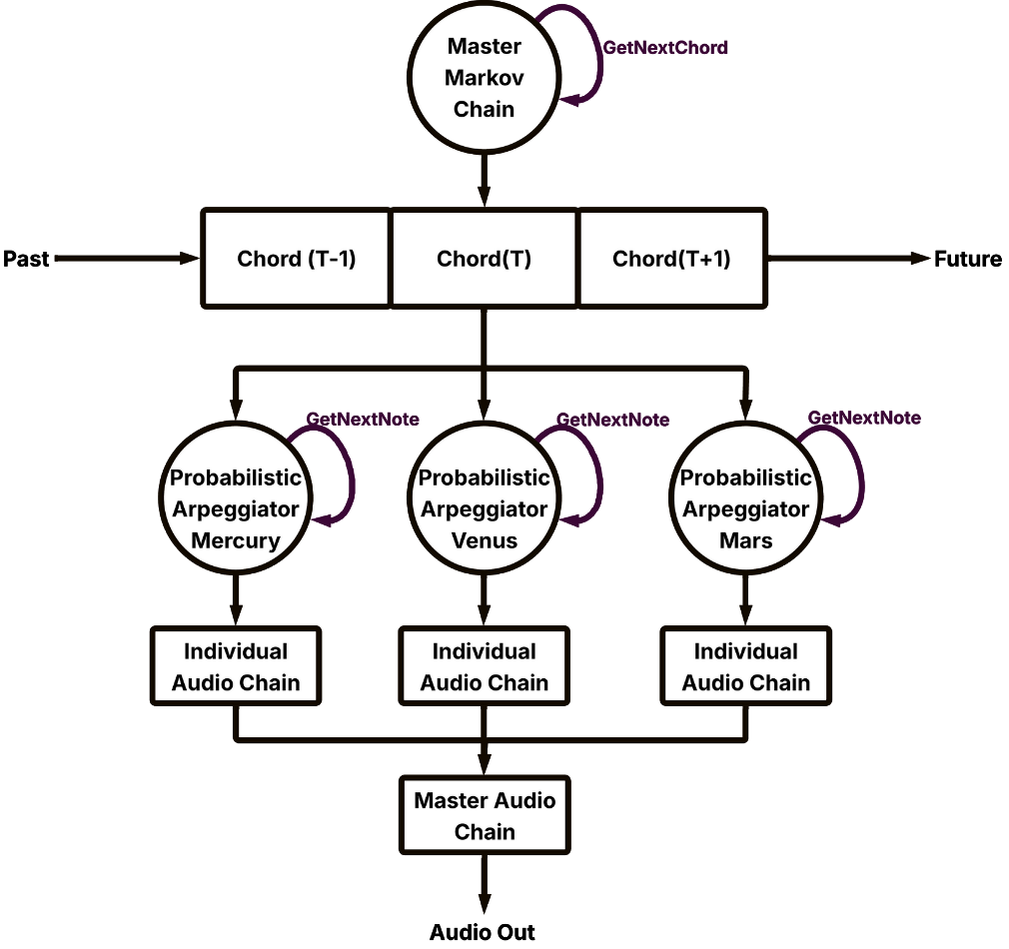
At the core there is a generative harmonic progression: chords are not chosen in a totally random way, but follow a Markov chain, which favors plausible and musically credible transitions (for example Cmaj9 → Am9 → Dm9), introducing variety without losing identity. This progression supports a Tone.js loop that, at each cycle, updates the chord, configures the synths, and sets spatialization according to the arrangement of objects in space.
Audio is also reactive to the camera: when the camera locks onto a celestial body via the gravity system, the related sound is perceptually “focused”: panning tends to center and volume increases, coherently with the idea of close observation. Conversely, distance directly influences perceived intensity: the farther an object is, the more its contribution is attenuated, obtaining a spatialized volume that reduces masking and keeps the overall mix readable.
Each category of celestial body has a dedicated musical role, so as to build a stable stratification. The Sun provides the base by playing the low root of the chord. The planets work on sustained notes, with a “glide” behavior on the root that emphasizes continuity and mass. The asteroids, finally, add fast details with short and fluid plucks, contributing to micro-dynamics without weighing down the sound scene.