Contact Stealer
Contact Stealer is an app developed for the Mobile Systems Security course at Adam Mickiewicz University in Poznań, created to demonstrate in a practical way how a covert (hidden) communication channel can bypass traditional security mechanisms by exploiting ultrasonic acoustic communication between two seemingly harmless apps.
General project structure
The system is composed of two distinct applications, each with a limited and “non-suspicious” set of permissions:
- App1 (Transmitter): requires authorization to read contacts (READ_CONTACTS) and transmits them via ultrasonic BFSK signals.
- App2 (Receiver): asks only for microphone access (RECORD_AUDIO), decodes the received signals, and sends the decoded contacts to Google Sheets.
In this way, neither app has simultaneous access to both sensitive data and the Internet. Contact transmission happens exclusively via ultrasound, a channel that is practically invisible to the user.

To send data from App1 –> App2, the project uses BFSK (Binary Frequency-Shift Keying) modulation, which encodes bits using two different frequencies. In this specific case:
- 0 → 20000 Hz
- 1 → 20500 Hz
Both frequencies are ultrasonic, therefore not audible, and each bit is represented by a sinusoidal tone lasting about 100 ms.
To increase reliability, each bit is repeated 3 times (redundancy). On the receiving side, a majority voting mechanism is applied, 5 ms fade-in/out is added to reduce sound artifacts, and band-pass filters are used to isolate the BFSK frequencies.
In addition, between the transmission of one contact and the next, a 1-second pause is included to avoid interference.
App1 - Transmitter
Required permissions: READ_CONTACTS
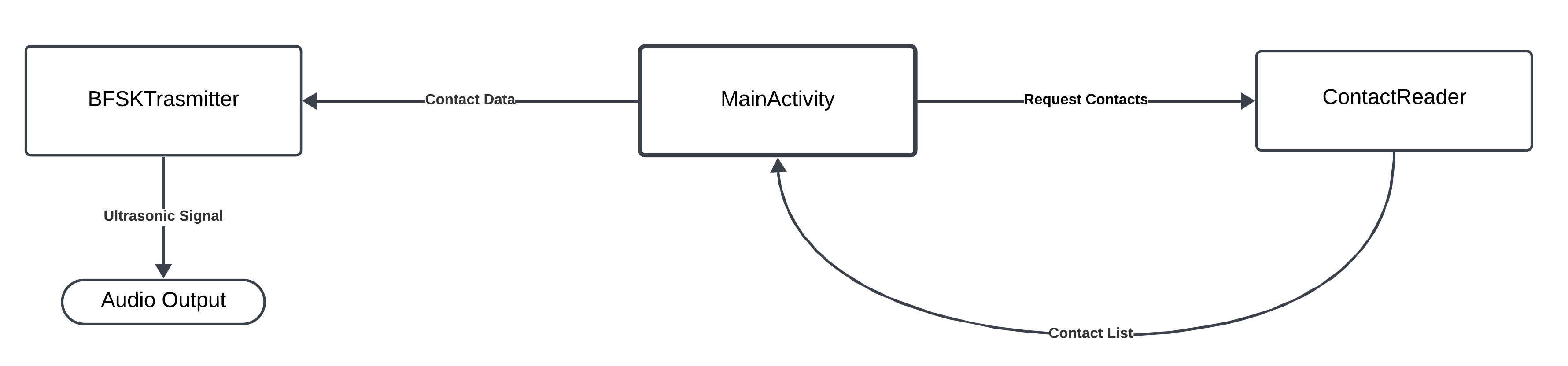
The app reads the entire device address book and transmits contacts one by one using BFSK modulation in the ultrasonic range.
The main “operational” components are two:
- ContactReader: a helper class that encapsulates the address book reading logic, using Android’s ContactsContract API. Its task is to extract contacts and return them in a uniform format like “Name:Number”;
- BFSKTransmitter: the part responsible for modulation and sound emission. In practice it generates the tones corresponding to 0 and 1, applies slight output filtering to avoid clicks or abrupt transients, packages each message into a structured frame (preamble, length, payload, suffix), and finally sends the signal.
A simple MainActivity orchestrates the operations and provides a basic user interface.
App2 - Receiver
Required permissions: RECORD_AUDIO
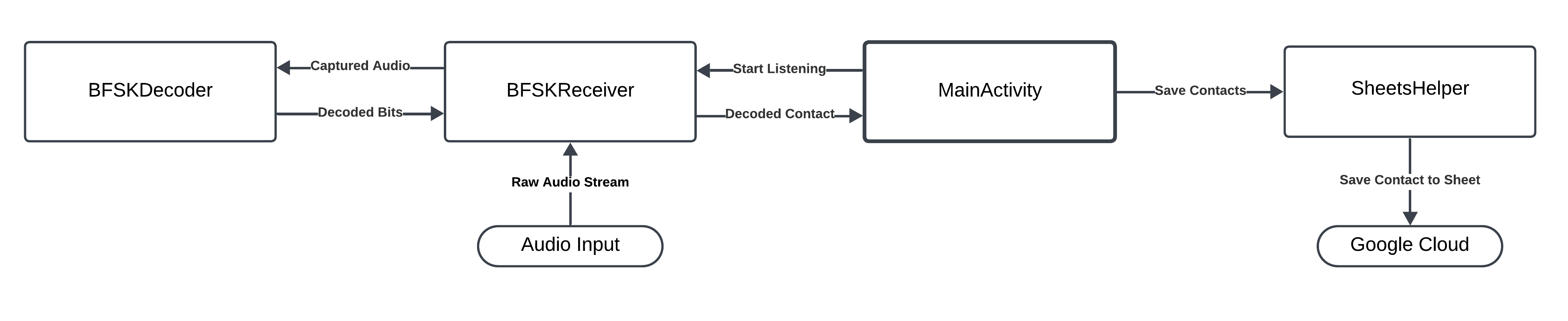
The app continuously listens through the device microphone, decodes ultrasonic BFSK signals and, once the contacts are reconstructed, sends them to a Google Sheet using the OAuth credentials of a service account.
In this case, the main components are:
- BFSKReceiver (1): the class that handles incoming audio. It opens and configures an AudioRecord, reads audio buffers, and passes them to the decoder.
- BFSKDecoder: implements the bit extraction logic from the signal: it applies two band-pass filters centered at 20 kHz and 20.5 kHz to isolate the components associated with 0 and 1, evaluates the relative energy of the two bands, and determines the incoming binary sequence, including the redundancy and majority voting mechanisms needed to mitigate environmental noise.
- BFSKReceiver (2): once bits are received from the decoder, BFSKReceiver handles recognition of the structured frames (preamble: 10101010, suffix: 11110000), the assembly of bit sequences into bytes, and the reconstruction of the final string “Name:Number”, which it then hands off to SheetsHelper for persistence.
- SheetsHelper: handles authentication to Google Sheets and data insertion: for each decoded contact it adds a row in the “Foglio1” sheet containing name, number, and timestamp, thus enabling structured collection and subsequent analysis of the received data.
A simple MainActivity orchestrates the operations and provides a basic user interface.
You can find more information about the project on GitHub.